Installing Pylux
Install directly from the Play Store:
Works on phones, tablets, and Android TV devices.
Install from the App Store:
Install from the Mac App Store:
- Installer — recommended for most users
- Portable zip — unzip and run, no install required
Steam Deck
Flatpak is the recommended install for Steam Deck — it integrates with the Discover store and updates automatically.
Copying from and Pasting into Konsole Windows
You can copy from and paste into konsole windows with Ctrl+Shift+C (copy) and Ctrl+Shift+V (paste) instead of the normal Ctrl+C (copy) and Ctrl+V (paste) shortcuts.
-
Open the Discover store
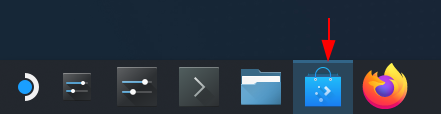
-
Search for
Pyluxin the search bar -
Click Install
-
Run the following command in the
konsoleflatpak install flathub io.github.ForWard_Technologies_LLC.Pylux -y
About the Pylux Flatpak
The Pylux flatpak is available on Flathub.
You can also build the flatpak yourself by following the instructions in Building the Flatpak Yourself.
-
Download the AppImage
-
Make it executable and run it:
chmod +x pylux-latest.AppImage
./pylux-latest.AppImage
Steam Deck / Steam
Set
APPIMAGE_EXTRACT_AND_RUN=1if Steam misbehaves with the AppImage.
-
Download the portable zip
-
Unzip and run
launch.sh(sets up bundled libs and OpenSSL fallback automatically)